How to Find Your CCLI License Number (and Where to Put It)
The short answer: your CCLI Church Copyright License number is printed on your CCLI renewal notice. CCLI’s own online store says so in as many words: “You’ll find your account or license numbers on your CCLI renewal notice.” If you cannot lay your hands on that notice, check the licence paperwork or confirmation emails, the footer of old slides and bulletins that already carry the number, and your presentation software’s copyright settings. If nobody at your church can find it, ask CCLI’s support team to confirm it.
This guide is for the volunteer who has just been told “we have a CCLI licence, put the number on the slides” and has no idea where it lives. The facts about what the number is for come from CCLI’s own pages, checked on November 4, 2026. The “where to look” steps are practical suggestions, and we say so where CCLI does not spell them out.
Two numbers people mix up
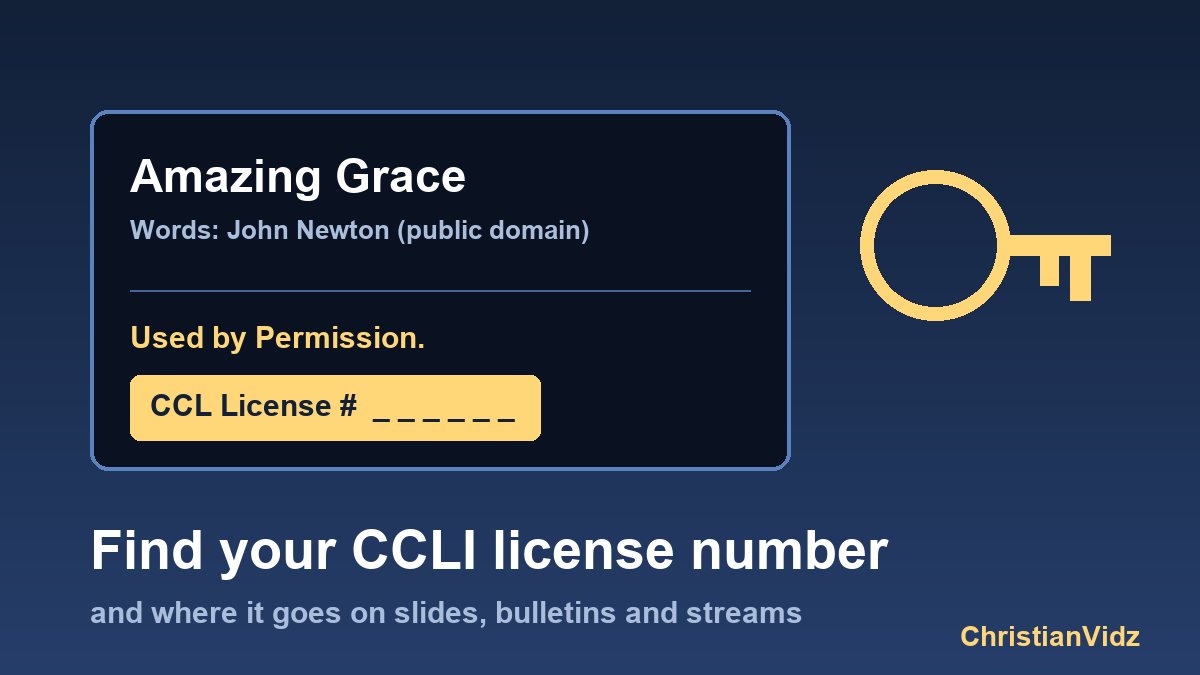
The most common mistake is not losing the number but using the wrong one. CCLI’s five-questions page includes an example copyright line for projected and printed songs:
“Hallelujah” words and music by John Doe · © 2018 Good Music Co. · Used by Permission. CCL License #12345
CCLI adds that the number at the bottom “should be your church’s license number, not the song’s CCLI ID number.” So there are two different numbers in play:
- Your licence number identifies your church or ministry. It is the same on every slide and every bulletin.
- The song’s CCLI number identifies one song in the catalogue. It changes with every song and is not what the notice is asking for.
A third number is easy to confuse as well. If your church subscribes to SongSelect, CCLI’s FAQ says individuals link a free SongSelect account to the subscription with a church Access Code. That code is for signing in, not for the copyright line.
Where to look, in the order that saves time
- The renewal notice. This is the document CCLI itself points to. Check the email inbox of whoever manages the licence and the church office post.
- The person who runs the account. In most churches that is the office manager, treasurer or worship pastor. A one-line message “do you have our CCLI licence number?” is faster than any search.
- Anything that already carries it. Last year’s bulletin, a song-slide template, the description of an earlier livestream. If your church has been compliant before, the notice “CCL License #…” is probably already in one of them. Copy it from there.
- Your presentation software. CCLI’s FAQ notes that ProPresenter users can enable Copyright Display in Preferences and enter the church licence number once, so it appears automatically. Other programs have a similar field, so open the settings of the one you use.
- A licence certificate or confirmation email. Church-music organisations such as Renewing Worship NC advise that the number appears on the licence certificate. Search your inbox for “CCLI” and “license”.
If nobody can find it
Do not guess and do not borrow another church’s number: the number ties your church to the licence you actually paid for. Instead, contact CCLI and ask them to confirm the number for your church.
One thing that does not help: the “Search for Your Organization” page on the CCLI store. It asks for an account or licence number plus your country, so it is a way to confirm a number you already have, not to recover a lost one.
Where the number has to appear
According to CCLI, one of the terms of the Church Copyright License is that you show the copyright information on each printed or projected song copy. For a song that runs across several slides, the information only has to appear once, usually at the start or the end. In practice that means three places:
- Projected lyrics. One closing slide, or a footer line in your slide template, is enough per song.
- Printed bulletins and song sheets. A single line under each song or a combined line at the bottom of the page.
- Livestreams and uploaded services. The CCLI Streaming License is a separate add-on, and CCLI says it covers streamed or uploaded services on your website and on platforms such as YouTube and Facebook. Streaming licences carry their own number, and our CCLI streaming licence explainer shows the description wording to use.
If you are building the live side of this for the first time, start with how to live stream a church service and the Christmas Eve livestream checklist, then compare tools in our church streaming software guide.
What the number does not cover
Having the licence number to hand does not mean everything on screen is covered. CCLI’s five-questions page says YouTube does not own the videos on its platform and cannot license them for public display, so showing a YouTube video in church needs permission from the copyright owner. Its “Showing Videos in Church” article adds that CCLI recommends official sources and that other videos should not be shown without the owner’s explicit permission. Motion backgrounds, countdowns and mini-movies come from their own vendors; see worship videos for church for how those licences differ from a music licence.
Why the account contact matters at reporting time
CCLI says reporting copy activity is a term of its licences. It can happen automatically through participating church presentation software, or manually on CCLI’s reporting site. Manual reporting runs for six months every two and a half years, and CCLI notifies you in advance by email and by mail. If the person on the account has left your church, those notices go to an inbox nobody reads, which is another reason to find the number and update the contact now.
A two-minute checklist
- Find the number on the renewal notice or from the account holder.
- Save it in your slide template and your bulletin template so nobody has to look again.
- Use the church licence number in the notice, never a song ID.
- Add your streaming licence number to livestream descriptions if you hold that licence.
- Check that the account contact is a current, reachable person.
Sources checked on November 4, 2026
- CCLI, The five questions we hear the most (notice format, licence number versus song ID, streaming, YouTube, reporting).
- CCLI Store, Find Organization (renewal notice).
- CCLI, Church Copyright License and Showing Videos in Church.
- CCLI, Frequently Asked Questions (SongSelect Access Code and ProPresenter copyright display; a regional page, so check your own country’s version).
- Renewing Worship NC, How to properly display copyright notices.
This article is general information, not legal advice. Licence terms differ by country and licence type, so confirm the details with CCLI for your church.